Excel is one of the most useful tools for students, office workers, freelancers, business owners, and anyone who works with data. Many people use Excel every day, but not everyone knows how to use it in a smart and time-saving way. The good news is that you do not need to be an expert to improve your skills. A few simple Excel tips can help you work faster, stay organized, and reduce mistakes.
In this article, you will learn 10 Excel tips for everyone that are easy to understand and useful in daily work. Whether you manage reports, track expenses, organize customer lists, or create business data sheets, these tips can make your work easier.
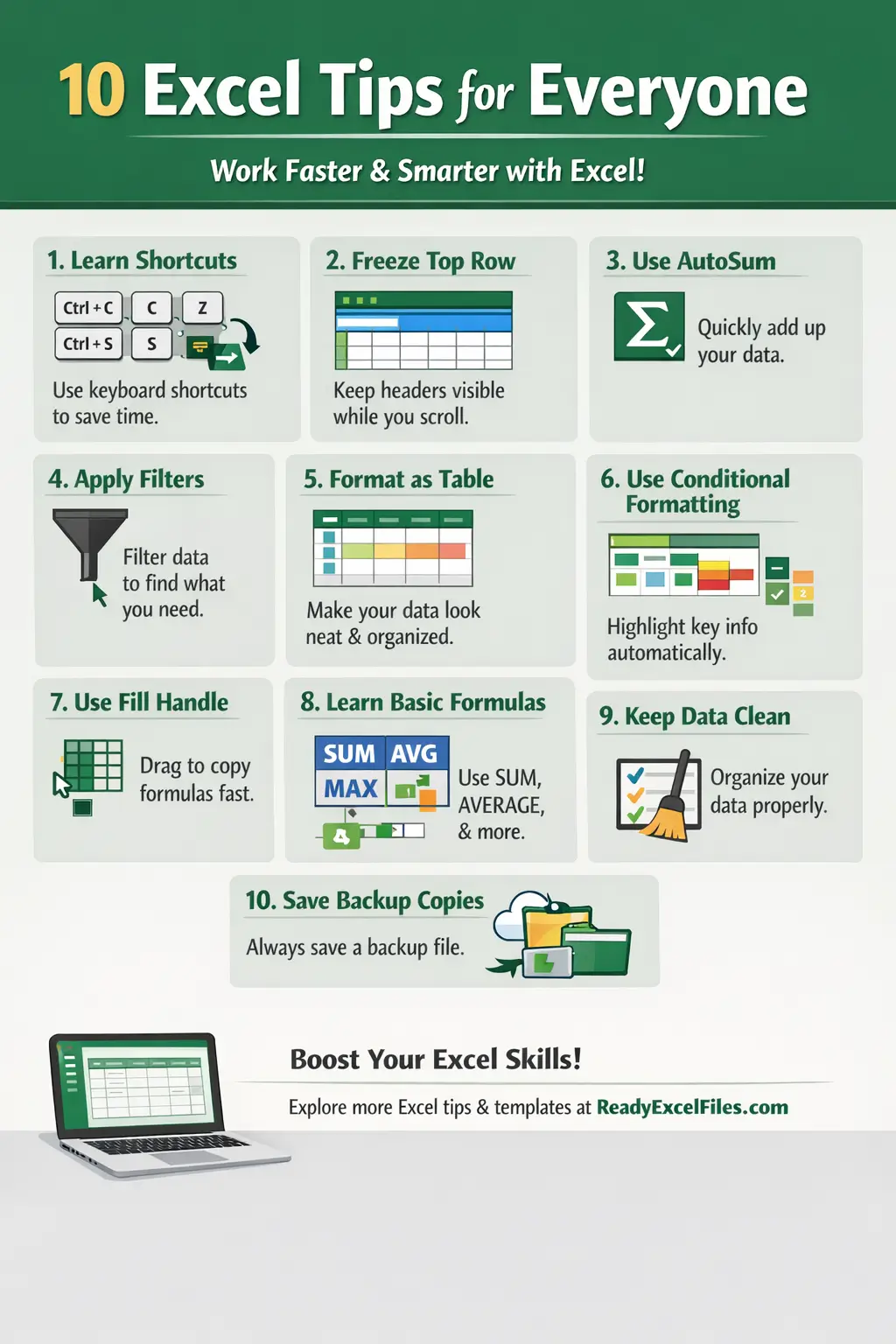
1. Learn Basic Keyboard Shortcuts
One of the best ways to save time in Excel is by using keyboard shortcuts. Instead of clicking every option manually, shortcuts help you complete tasks in seconds.
Some important shortcuts include:
Ctrl + C = Copy
Ctrl + V = Paste
Ctrl + Z = Undo
Ctrl + S = Save
Ctrl + F = Find
Ctrl + A = Select all
These simple shortcuts may look small, but they can save a lot of time every day.
2. Use AutoSum for Quick Calculations
Many people waste time typing formulas manually. Excel has a built-in feature called AutoSum that helps you quickly add numbers.
You can use AutoSum to calculate:
Total sales
Monthly expenses
Profit and loss
Quantity totals
This is one of the most useful Excel tips for beginners because it makes calculations fast and accurate.
3. Freeze the Top Row
When you work with a large spreadsheet, it becomes difficult to remember which column contains which data. That is where Freeze Panes becomes very helpful.
By freezing the top row, your headers stay visible while scrolling down. This makes your sheet easier to read and helps reduce confusion.
This tip is perfect for:
Sales reports
Employee lists
Inventory sheets
Customer databases
4. Turn Your Data into a Table
Formatting your data as a table makes your spreadsheet look cleaner and more professional. It also improves sorting, filtering, and formula handling.
When you convert data into a table, Excel automatically adds useful features like:
Filter buttons
Better design
Easy row and column management
Automatic formatting
This is one of the smartest Excel tips for everyone because it improves both appearance and usability.
5. Use Filters to Find Data Quickly
If your Excel file contains a lot of rows, finding specific information manually can take a long time. With Filters, you can quickly sort and search your data.
You can filter by:
Name
Date
Category
Amount
Status
For example, if you want to see only unpaid invoices or only products from one category, filters make that task much easier.
6. Apply Conditional Formatting
Conditional formatting helps Excel automatically highlight important data. This means you can quickly spot numbers, errors, duplicates, or trends without checking every cell manually.
You can use it to:
Highlight top values
Mark duplicate entries
Show overdue dates
Identify low stock
Spot negative numbers
This feature is excellent for business reports and performance tracking.
7. Use the Fill Handle to Save Time
The Fill Handle is the small square at the corner of a selected cell. You can drag it down or across to copy formulas, numbers, dates, or patterns.
For example, it can help you:
Continue serial numbers
Copy formulas instantly
Fill months or days automatically
Repeat text patterns
This is one of the easiest Excel tips, but it can save a lot of effort in daily work.
8. Learn Basic Formulas
You do not need advanced Excel knowledge to do useful work. Just learning a few basic formulas can make a big difference.
Start with these formulas:
SUM = adds numbers
AVERAGE = finds the average
COUNT = counts cells with numbers
MAX = shows the highest value
MIN = shows the lowest value
These formulas are useful in almost every kind of Excel task, from finance to reporting to simple data management.
9. Keep Your Data Clean and Organized
A clean Excel sheet is easier to understand and easier to analyze. Many people make mistakes because their data is not properly organized.
Here are some simple rules:
Keep one type of data in one column
Use clear column names
Avoid empty rows in the middle of data
Use consistent date and number formats
Remove duplicate entries when needed
Clean data helps you create better reports and reduces errors in formulas.
10. Always Save a Backup Copy
One of the most important Excel tips for everyone is to always keep a backup of your file. Sometimes files get deleted, changed by mistake, or corrupted.
You can protect your work by:
Saving files regularly
Using cloud storage
Keeping a second copy
Naming versions clearly
This simple habit can save you from losing hours of important work.
Why These Excel Tips Matter
Excel is not just a spreadsheet program. It is a powerful tool that helps people manage information, make decisions, and improve productivity. When you know the right Excel tips, you can finish work faster, reduce mistakes, and feel more confident using spreadsheets.
These tips are useful for:
Students
Teachers
Small business owners
Accountants
Office staff
Freelancers
Marketers
Data entry workers
No matter your profession, better Excel skills can improve your daily work.
Explore more useful Excel tips, templates, and resources at Ready Excel Files: Excel Expert Blog for smarter daily spreadsheet work.
Final Thoughts
Learning Excel does not have to be difficult. Small improvements can create big results over time. These 10 Excel tips for everyone are simple, practical, and effective for daily use. Start applying them one by one, and you will notice that your work becomes faster, easier, and more professional.
If you want to grow your productivity, improve your reports, and work smarter with spreadsheets, Excel is one of the best tools to master.